How Agentic DevOps Transforms the Software Development Lifecycle — From Requirements to Deployment
Purpose
Across every phase of software development — requirements, design, implementation, testing, deployment, and maintenance — development teams work with a wide range of tools and data sources. Requirements management often relies on Microsoft 365 Copilot and SharePoint, implementation on GitHub Copilot and Azure, and CI/CD on GitHub Actions. Each phase requires integration across different services. Traditionally, teams had to build custom integrations for each service, which became a major obstacle to efficiency.
Agentic DevOps is an approach in which AI agents act as members of the development and operations team, automating and optimizing every stage of the SDLC. By using the Model Context Protocol (MCP) to connect tools, you can build an AI-centric SDLC. This frees development teams from constant tool switching and manual data synchronization, letting them focus on creative work.
This article explains how to apply AI agents from the Microsoft ecosystem at each phase of the SDLC.
Overview of AI Adoption in the SDLC
The architecture diagram below shows where AI agents can be deployed across phases — from requirements through operations.
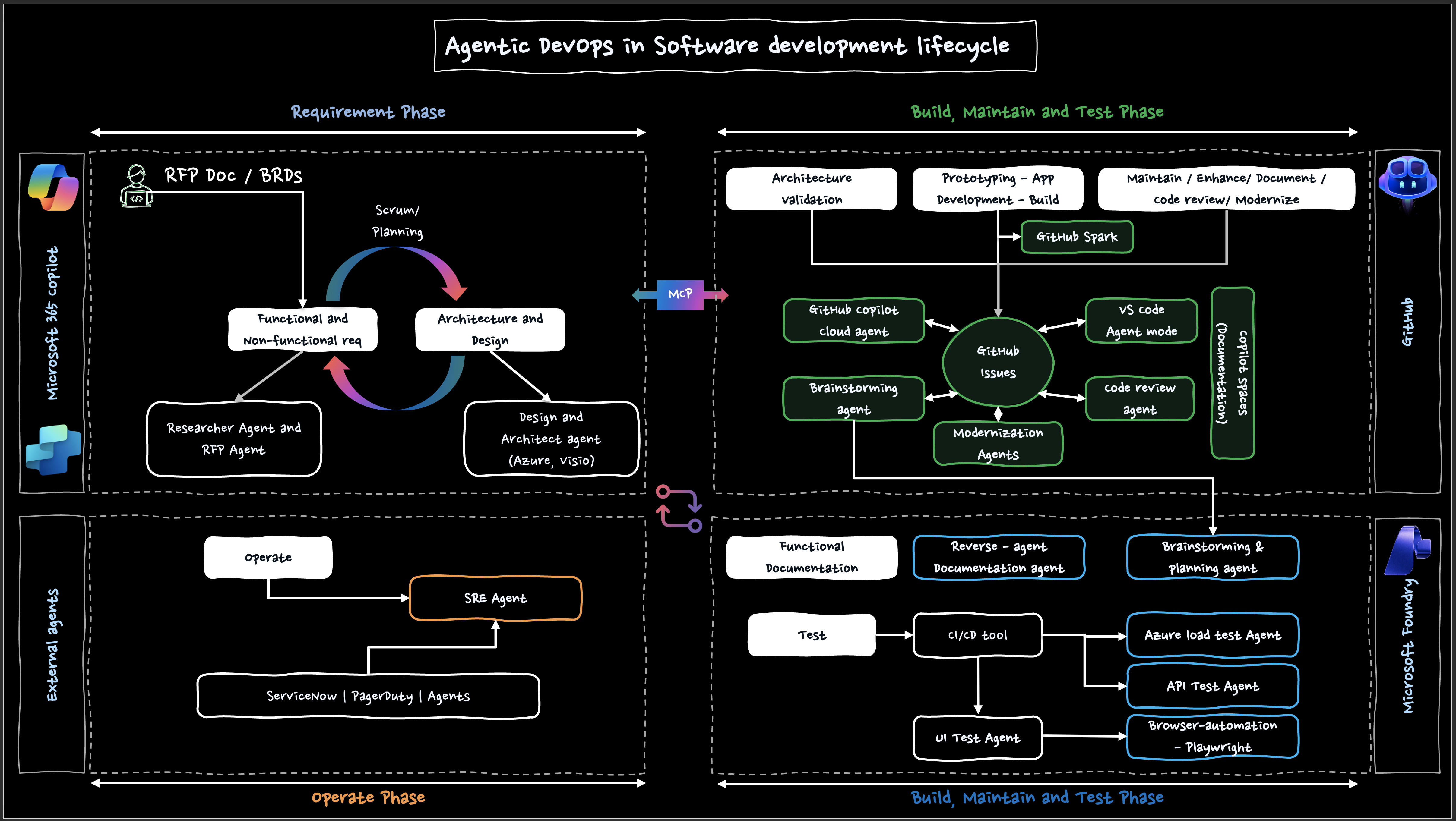 Figure 1: Overall architecture for SDLC integration using MCP
In each phase, AI agents from Microsoft 365 Copilot, GitHub Copilot, and Microsoft Foundry (formerly Azure AI Foundry / Azure AI Studio) play their own roles.
Note: References to “*** Agent” in this article are role names (use cases), not product names. Implementation combines the official products and features described later.
Requirement Phase
In the requirements phase, AI assists with analyzing RFPs (Request for Proposal) and BRDs (Business Requirements Document), organizing functional and non-functional requirements, and designing the architecture. Requirement extraction and design are iterative processes that interleave with Scrum planning, and AI accelerates that loop.
MCP is a protocol for integrating with external tools. Automation such as creating GitHub Issues from documents on SharePoint can be realized by preparing an MCP-compatible server. Microsoft Copilot Studio, on the other hand, supports integrations using Power Platform connectors (including custom connectors). These are different mechanisms, but combining them enables flexible automation flows.
Applicable AI Agents (Role Names and Implementation Examples)
| Role Name | Role | Implementation Example |
|---|---|---|
| Researcher Agent | Collect and summarize related information; organize requirement discussion points | Microsoft 365 Copilot |
| RFP Agent | Draft proposals and reflect changes | Microsoft Copilot Studio |
| Design and Architect Agent | Support architecture design and diagramming | Azure / Microsoft Visio |
| Issue creation automation | Create GitHub Issues from requirements | MCP server + Copilot Studio |
Expected benefits:
- Reduced time from document analysis to first-draft Issue creation
- Lower risk of overlooking requirements (final review remains with humans)
- Traceability between requirements and the backlog
Practical Tips
1. RFP/BRD Document Analysis → GitHub Issue Creation Flow
- Use Microsoft 365 Copilot to extract key points and discussion items from large RFP/BRD documents and organize them into requirement candidates.
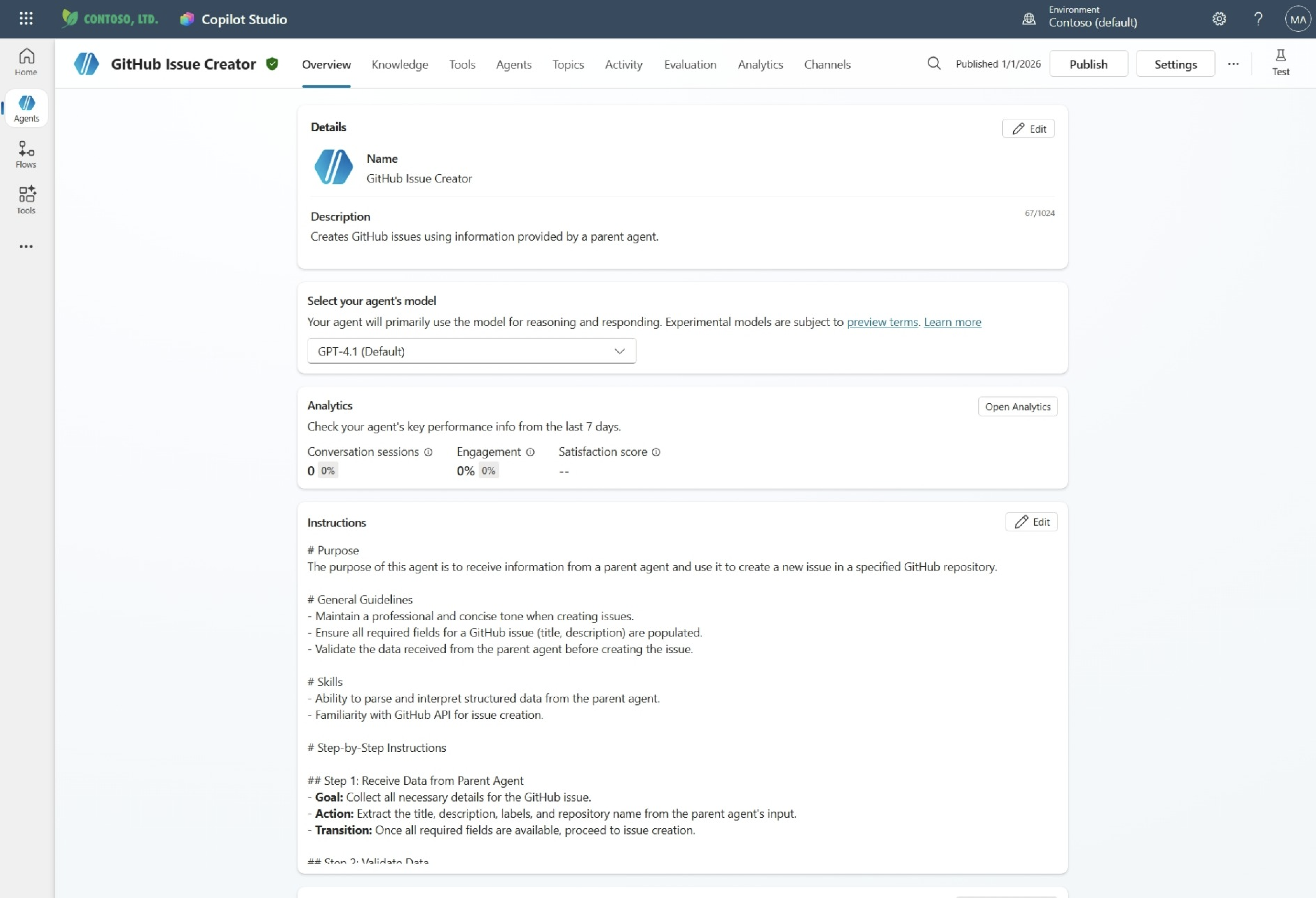
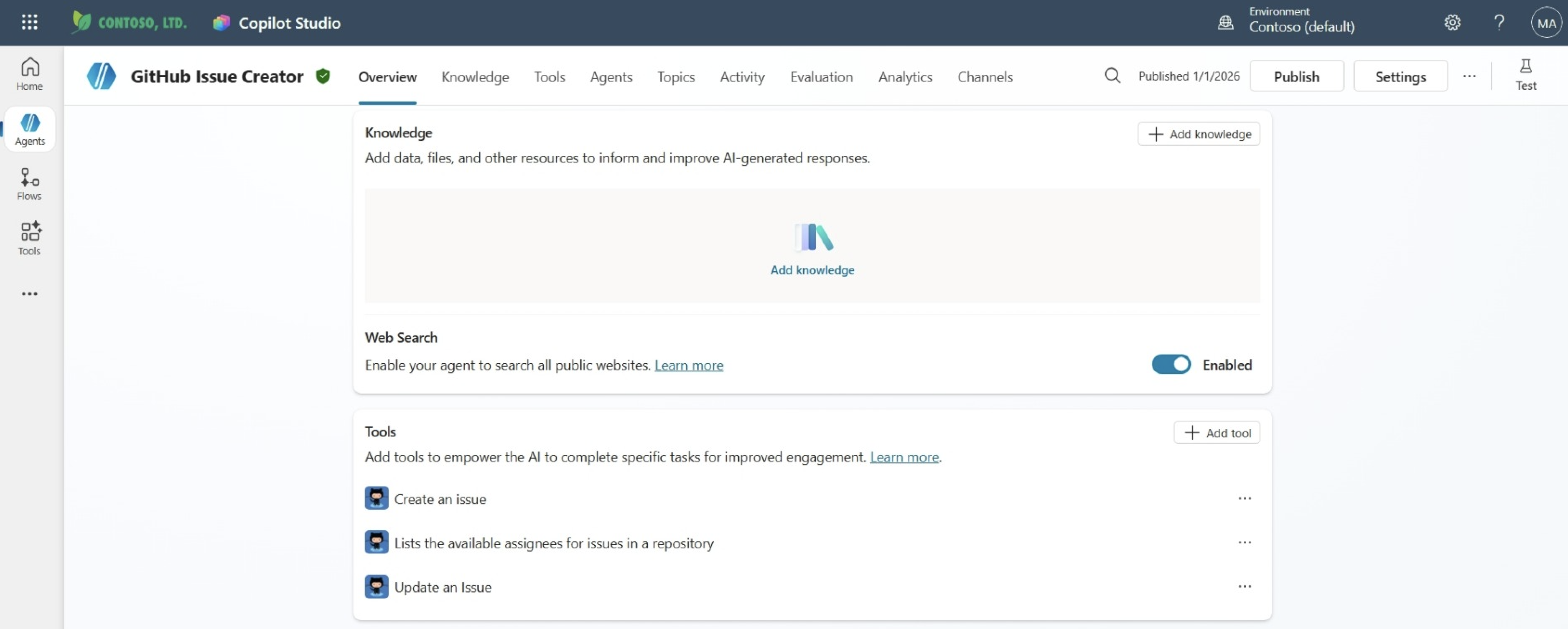
- Starting from documents stored in SharePoint, configure an Agent in Copilot Studio and automate Issue creation through a GitHub MCP server. Use Power Platform connectors for external service integration on the Copilot Studio side, and configure the MCP server as a tool for GitHub operations.
sequenceDiagram
    participant SP as SharePoint
    participant Agent as Copilot Agent
    participant MCP as MCP Server
    participant GH as GitHub

    SP->>Agent: Document change notification
    Agent->>Agent: Extract & classify requirements
    Agent->>MCP: Issue creation request
    MCP->>GH: Create Issue
    GH-->>MCP: Issue URL
    MCP-->>Agent: Creation completion notice
    Agent-->>SP: Update link
2. Scrum / Backlog Setup
Based on the extracted requirements, AI helps prioritize items and organize the rationale behind story-point estimation. Microsoft 365 Copilot uses Microsoft Graph and the Semantic Index for Copilot to summarize and organize content based on emails, meetings, and documents the user has access to.
3. Architecture Design
The Design and Architect Agent (a role name) supports drafting Azure service architectures and diagramming with Microsoft Visio. It can also propose design pattern candidates based on security and availability requirements.
Automation flow:
- Document storage: Upload or update RFP/BRD on SharePoint
- Requirement extraction: A Copilot Agent parses the document and structures the requirements
- MCP integration: Call the GitHub Issue creation tool through an MCP server
- Issue creation: Set title, description, labels, and assignees
- Backlog addition: Add to a Project Board
Build, Maintain and Test Phase — GitHub
On the GitHub platform, GitHub Issues and Pull Requests (PRs) act as hubs, and GitHub Copilot supports implementation, review, and context sharing.
In VS Code, in addition to GitHub Copilot Chat, you can leverage Copilot Edits for multi-file editing and Agent mode, which iterates autonomously until a task is complete. Agent mode can be combined with MCP servers to extend access to external tools.
Applicable Products and Features
| Product / Feature | Position | Main Use |
|---|---|---|
| GitHub Copilot (VS Code: Chat / Copilot Edits / Agent mode) | Development support | Architecture discussion, multi-file editing, refactoring, adding tests, iterating on error fixes |
| Copilot cloud agent (formerly Copilot coding agent) | Implementation automation | Investigates and plans against the repository based on Issues or instructions, creates code changes, and submits PRs |
| Copilot code review | Review support | Aspect-based code review and improvement suggestions. Agentic capabilities also enable repository-wide context analysis |
| GitHub Spark (public preview) | Prototyping | Build full-stack web apps from natural language and iterate while deploying |
| Copilot Spaces | Context / knowledge management | Organize and share context such as repositories, PRs, Issues, notes, and images to improve Copilot Chat answer quality. Also accessible from the IDE through the GitHub MCP server |
| Copilot Memory (public preview) | Repository knowledge accumulation | Infers and stores useful information about the repository to improve Copilot cloud agent and code review output quality |
Note: The “Brainstorming agent”, “Modernization agents”, and “Code review agent” shown in the attached figure are role names. They are implemented by combining Copilot Chat / Copilot Edits / Agent mode, Copilot cloud agent, and Copilot code review from the table above.
Difference between Copilot cloud agent and Agent mode: Copilot cloud agent runs autonomously on GitHub.com using a GitHub Actions environment. Agent mode runs autonomously in a local IDE environment such as VS Code. Choose the right tool for each use case.
Practical Tips
1. Development Support with GitHub Copilot
GitHub Copilot accelerates the “implement → verify → fix” loop with code completion plus multi-file edits (Copilot Edits) and Agent mode. Agent mode picks relevant files based on the intent of the task and iterates by suggesting fixes and commands until completion.
Expected benefits:
- Shorter iterative coding and revision work
- Faster initial progress on changes that span multiple files
- Onboarding support through deeper understanding of existing code
2. Code Review and Implementation Automation
Copilot code review reviews PR contents and offers improvement suggestions. With Agentic capabilities (GA), it can perform high-accuracy reviews that take repository-wide context into account. You can also pass suggestions to Copilot cloud agent to automatically create fix PRs (public preview).
Copilot cloud agent investigates the repository based on Issues or instructions, plans the work, and creates code changes on a branch. After reviewing and iterating on the changes, you can open a PR. This streamlines the “implement → review → iterate” loop driven by GitHub Issues.
flowchart TD
    A[Issue / PR origin] --> B{Copilot cloud agent / IDE Agent mode}
    B --> C[Create changes and reflect in PR]
    C --> D{Copilot code review}
    D --> E[Improvement suggestions]
    E --> F[Developer decides and revises]
    F --> D
3. Documentation and Knowledge Management
Copilot Spaces organizes and shares the context (repositories, PRs, Issues, notes, images, files, and so on) that Copilot Chat references. It aligns the team on “what we are assuming when we talk”, improving the efficiency of Q&A and documentation work. From the IDE, you can also access the context of Spaces through the GitHub MCP server.
Copilot Memory (public preview) infers and stores useful information about the repository so that Copilot cloud agent and code review can reference it. Storing team coding conventions and project-specific knowledge can continuously improve output quality.
References (official):
- GitHub Copilot features
- About Copilot cloud agent (formerly Copilot coding agent)
- About GitHub Copilot code review
- About GitHub Copilot Spaces
- Building and deploying AI-powered apps with GitHub Spark
- Enhance agent mode with MCP
- About Copilot Memory
Build, Maintain and Test Phase — Azure / Microsoft Foundry
In this phase, CI/CD acts as the hub for continuously running various tests (load tests, API tests, UI/E2E tests), shortening the quality feedback loop.
Microsoft Foundry (formerly Azure AI Foundry / Azure AI Studio) is an Azure PaaS that supports the development, evaluation, and operation (evaluation, tracing, and monitoring) of AI applications and AI agents. Using Foundry Agent Service, you can build and deploy prompt agents, workflow agents, and hosted agents.
Applicable AI Agents (Role Names and Implementation Examples)
| Role Name | Implementation Example (official products / features) | Use |
|---|---|---|
| Reverse-agent Documentation agent | GitHub Copilot, etc. | Generate first drafts of documentation / specifications from changes |
| Brainstorming & planning agent | Microsoft Foundry | Help organize test perspectives, evaluation criteria, and datasets |
| Azure Load Test Agent | Azure Load Testing | Automate and continuously run performance (load) tests |
| API Test Agent | Playwright (API testing), integration tests | Validate endpoints (regression checks for API specs) |
| UI Test Agent | Playwright (E2E / UI testing) | Automated screen-operation tests (regression tests) |
| Browser-automation | Playwright Workspaces (Azure App Testing) | Execution platform for browser automation tests (local / cloud) |
Practical Tips
1. CI/CD Pipeline Integration
From GitHub Actions, run load tests with Azure Load Testing and UI/E2E tests with Playwright to continuously verify quality. GitHub Copilot can help create and update test cases (final judgment is made by developers).
flowchart LR
    A[Code change] --> B[CI/CD trigger]
    B --> C["Create / update tests (Copilot assists)"]
    C --> D["Run tests (Playwright / Azure Load Testing)"]
    D --> E{Test results}
    E -->|Success| F[Deploy]
    E -->|Failure| G[AI debugging support]
    G --> A
Benefits of GitHub Actions + Playwright:
- Cross-browser support (Chromium, Firefox, WebKit)
- Fast feedback through parallel execution
- AI assistance for test creation and maintenance (with review)
Benefits of GitHub Actions + Azure Load Testing:
- Automatically run load tests from CI/CD and judge pass/fail by thresholds
- Save results as artifacts and track regression trends
2. Guideline for Test Automation
pie
    title Test Automation
    "UI Test Agent" : 10
    "API Test Agent" : 30
    "Unit Tests (GitHub Copilot)" : 60
| Test Layer | Role Name | Automation Rate Guideline |
|---|---|---|
| Unit Tests | GitHub Copilot | 80%+ |
| API Tests | API Test Agent | 70%+ |
| UI Tests | UI Test Agent + Playwright | 50%+ |
| Load Tests | Azure Load Test Agent | As needed |
Note: The automation rates above are example guidelines for teams, not official recommended values. Adjust them based on product characteristics (release cadence, SLAs, risk tolerance).
References (official):
- What is Microsoft Foundry?
- What is Foundry Agent Service?
- Azure Load Testing — Configure CI/CD workflows
- Playwright Workspaces — Quickstart for continuous E2E testing
Operate Phase
In the operations phase, Azure SRE Agent handles monitoring, incident response, and operational automation, supporting stable system operation.
Applicable AI Agents
| Role Name | Implementation Example (official products / features) | Use |
|---|---|---|
| SRE Agent | Azure SRE Agent | Automation of monitoring and incident response (Runbook execution, notifications, report generation). Continuous improvement through learning the environment and accumulating knowledge |
| ITSM integration (ticketing) | ServiceNow | Automatic creation and update of incident / change management tickets triggered by monitoring alerts. Understand impact scope through CMDB linkage and automate approval flows |
| On-call notification & escalation | PagerDuty | Incident notification and escalation based on on-call rotation; bi-directional integration with the SRE Agent for incident creation and automatic closure after recovery |
Practical Tips
1. Integration with External Services
Azure SRE Agent can integrate not only with Azure monitoring foundations such as Azure Monitor, Application Insights, and Log Analytics, but also with the following external ITSM / on-call management tools. Through MCP server integration, information collected by the SRE Agent can be linked bi-directionally to ticketing and notification systems.
- ServiceNow: Use as the SoR (System of Record) for incident / change management. The SRE Agent automatically creates tickets for detected events and links them to configuration items in the CMDB, enabling impact scope analysis and approval processes that follow ITSM practices.
- PagerDuty: Use as the foundation for on-call notification and escalation. By syncing incidents on the SRE Agent side with incidents in PagerDuty, you can automate notifications, escalation, and post-recovery closure.
- Grafana / Datadog / New Relic / Dynatrace: Integration with observability platforms allows the SRE Agent to perform investigations across metrics, logs, and traces.
Note: For Azure SRE Agent, you can choose only one incident platform per agent from Azure Monitor, PagerDuty, and ServiceNow. If you need to use multiple SoRs in parallel, consider splitting agents or supplementing with external workflows (such as Logic Apps).
You can also connect to GitHub repositories and Azure DevOps to feed test results from CI/CD back into operations.
2. Operational Automation with SRE Agent
Azure SRE Agent automates incident response and operates monitoring and alerts. Using custom Runbooks and sub-agents, it can manage any Azure service through Azure CLI or REST APIs.
A distinctive feature is its “Memory” capability, which learns root causes, resolution steps, and team patterns from each investigation. As team knowledge accumulates, even new members can maintain consistent on-call quality.
flowchart TD
    A[Monitoring alert] --> B{Azure SRE Agent}
    B --> C[Root cause analysis]
    B --> D[Identify impact scope]
    C --> E[Suggest response]
    D --> E
    E --> F{Auto-remediable?}
    F -->|Yes| G[Auto-recovery]
    F -->|No| H[Notify on-call via PagerDuty]
    B --> J[Create ticket in ServiceNow]
    G --> I[Generate post-incident report]
    H --> I
    J --> I
Expected benefits:
- Reduced MTTR (Mean Time To Recovery)
- Lower on-call burden
- Standardized incident response and accumulated knowledge
References (official):
- What is Microsoft Foundry?
- What is Foundry Agent Service?
- Azure SRE Agent overview
- Tutorial: Connect to ServiceNow in Azure SRE Agent
- Tutorial: Connect to PagerDuty in Azure SRE Agent
-
Incident Platforms in Azure SRE Agent
MVP Implementation Highlights
This section introduces an MVP implementation procedure to reach “something that just works” as quickly as possible based on the architecture above.
Prerequisites (minimum setup)
- Access to SharePoint (where RFP/BRD documents are stored)
- A GitHub repository with Issues enabled
- GitHub Copilot available
- Microsoft Copilot Studio (or an equivalent runtime) to configure the Agent
- An MCP server available
Acceptance Criteria (MVP)
- Updates to RFP/BRD trigger the creation of requirement candidates as GitHub Issues
- A prototype application is created and minimum operation can be confirmed
- Implementation changes are submitted as PRs and can be reviewed
- A minimum set of automated tests runs in CI and the results can be reviewed
1. RFP Analysis → Automatic Linkage to GitHub Issues
Goal
- On RFP/BRD changes, automatically draft requirements as GitHub Issues
Steps (example)
- Based on the RFP/BRD, extract and classify requirement candidates with the Researcher Agent (role name) — functional / non-functional, etc.
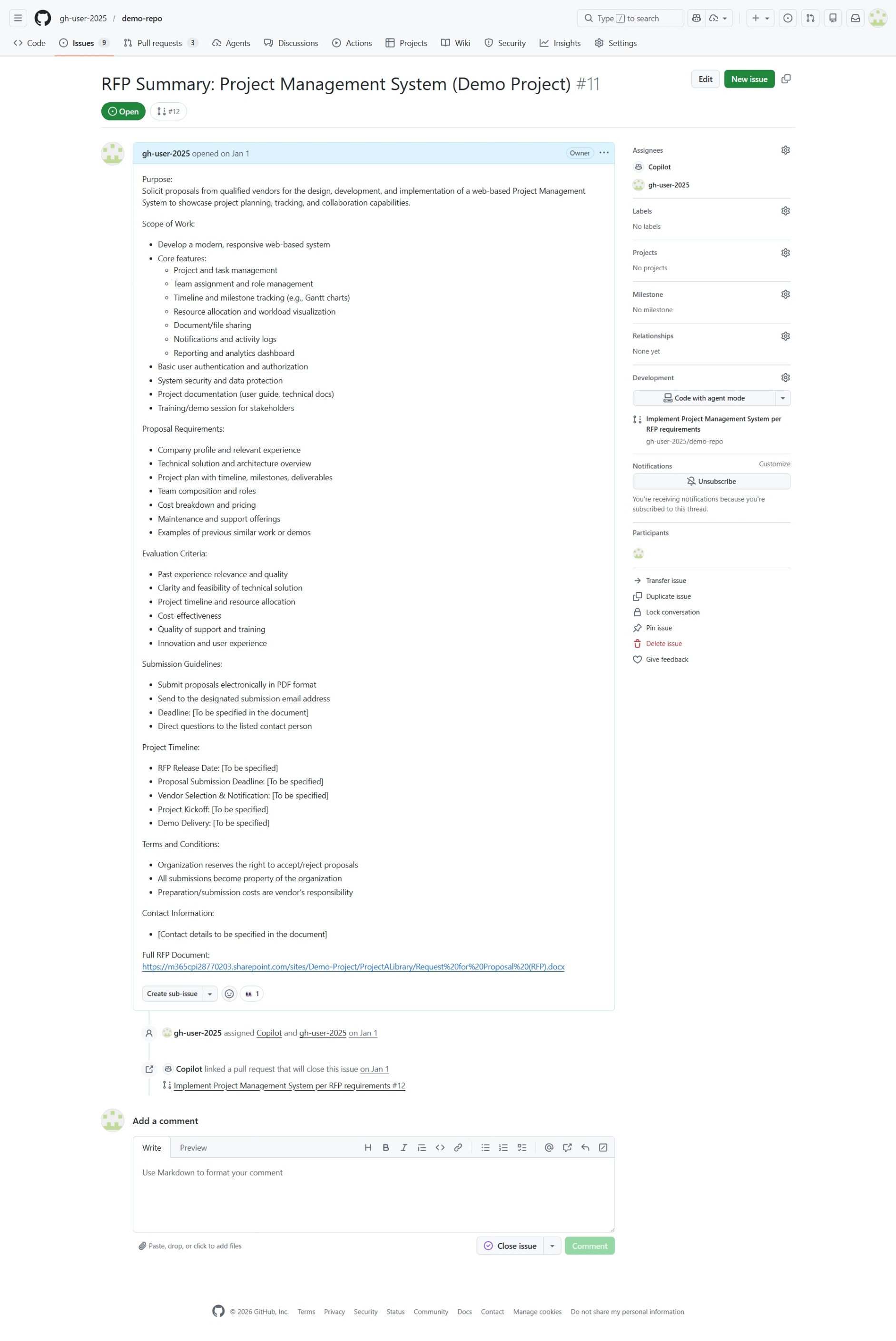
- Create Issues through the GitHub MCP server (title, body, labels, assignees, related links)
Deliverables
- GitHub Issues (requirement candidates) — functional requirements, non-functional requirements, architecture
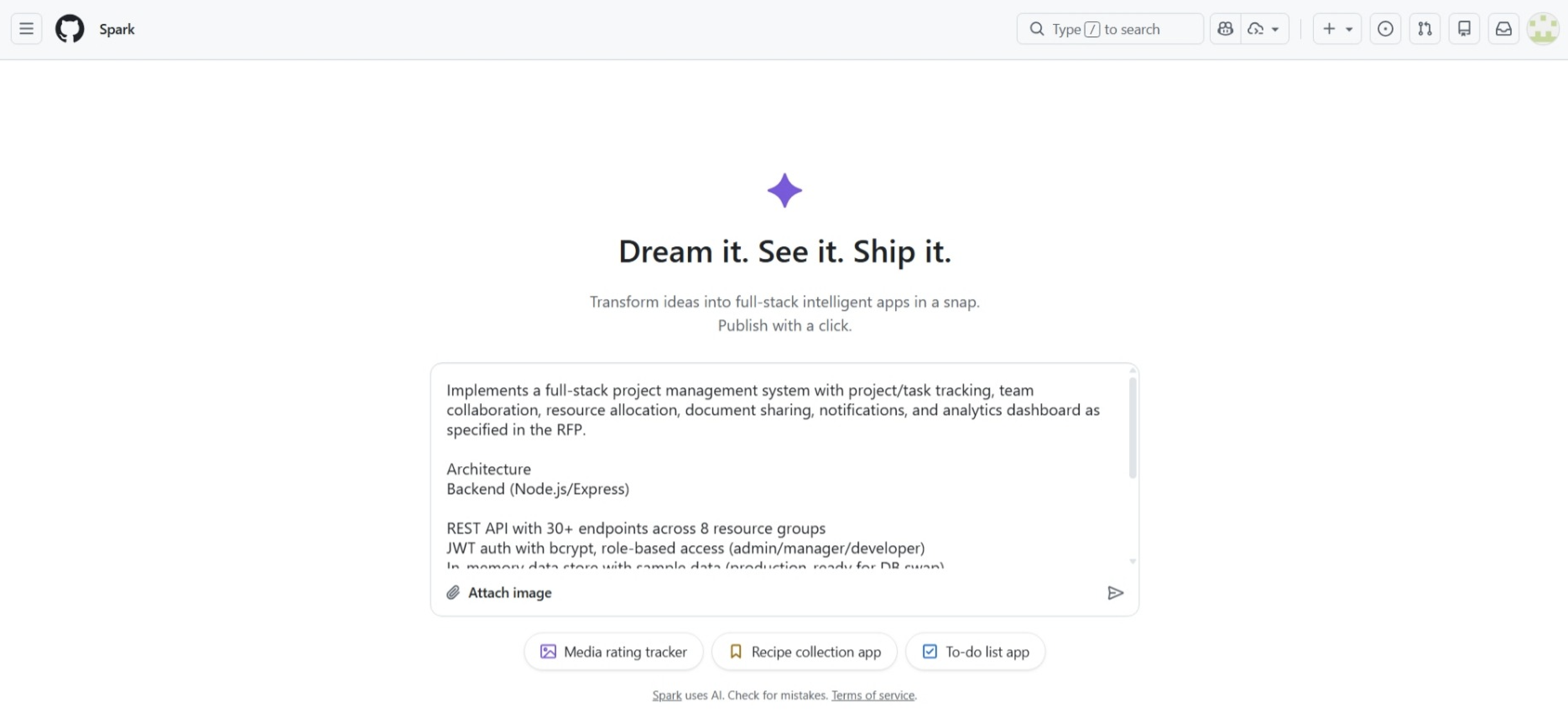
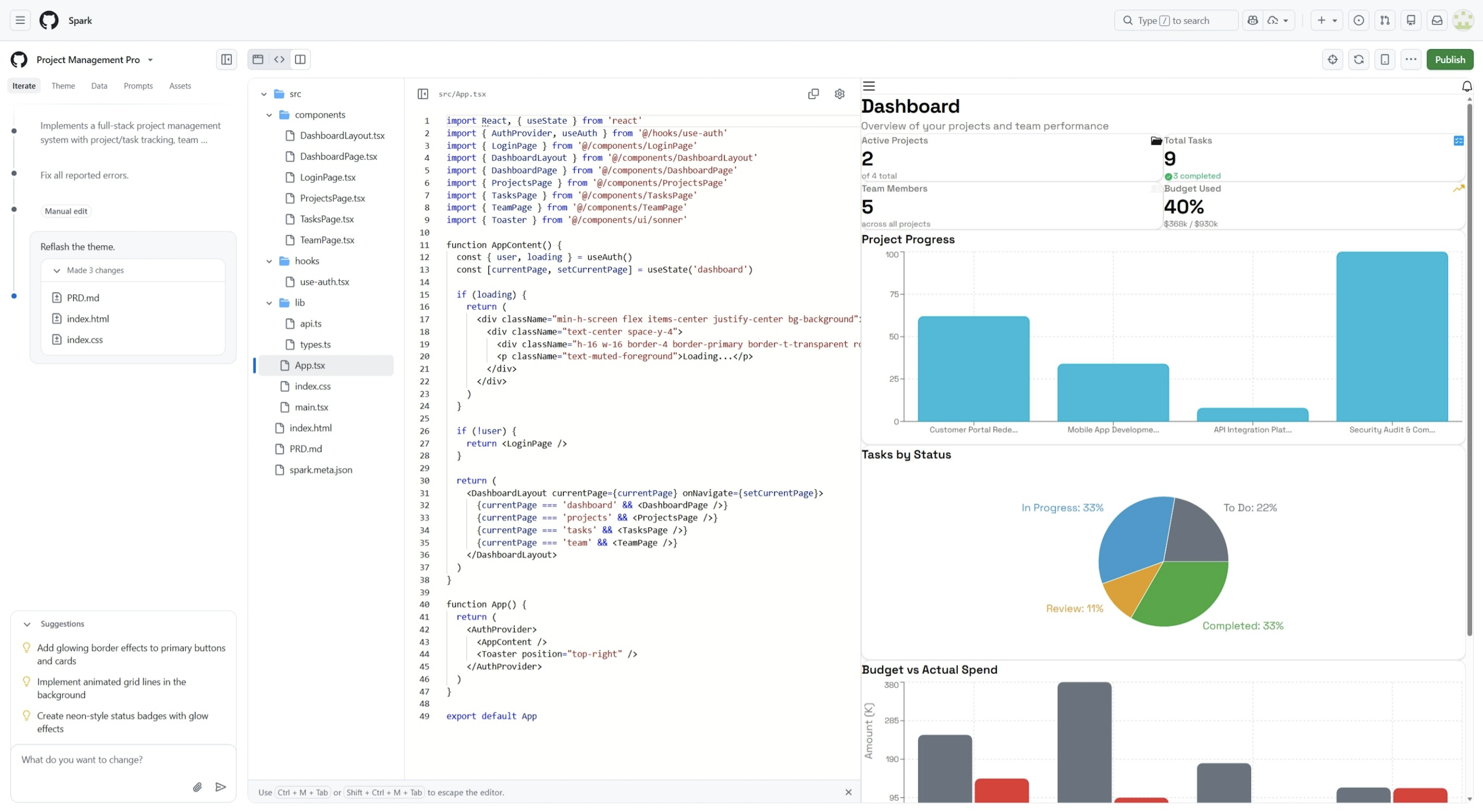
2. Prototype Application Development (GitHub Spark)
Goal
- Build a prototype that satisfies a subset of the requirements in a short time and align stakeholders
Steps (example)
- Tell GitHub Spark the purpose and minimum scope of the application in natural language
- Decide the inputs and outputs (screens, APIs, data) at minimum configuration
- Describe the expected behavior as a simple scenario and verify the operation
Deliverables
- A prototype application (URL or repository)
- Operation confirmation scenarios (expected vs. actual results)
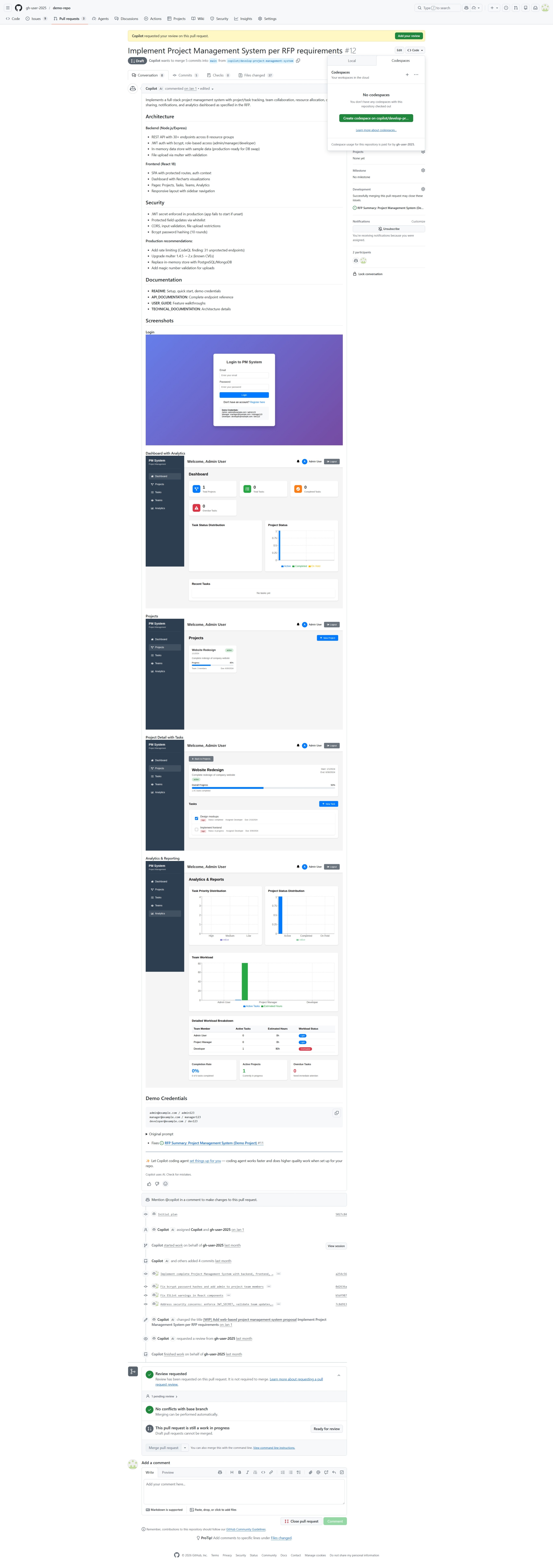
3. Implementation with Copilot Cloud Agent
Goal
- Drive implementation from Issues and submit PRs (running the review-and-iteration loop)
Steps (example)
- Add MVP Acceptance Criteria to the Issue
- Ask Copilot cloud agent to implement; it investigates the repository, plans, makes code changes, and creates a PR
- Use Copilot code review (or human review) to surface improvements and iterate
Deliverables
- A PR (implementation changes, description, links to related Issues)
- Review notes (security, quality, observability, etc.)
4. Test Automation (GitHub Actions + Azure)
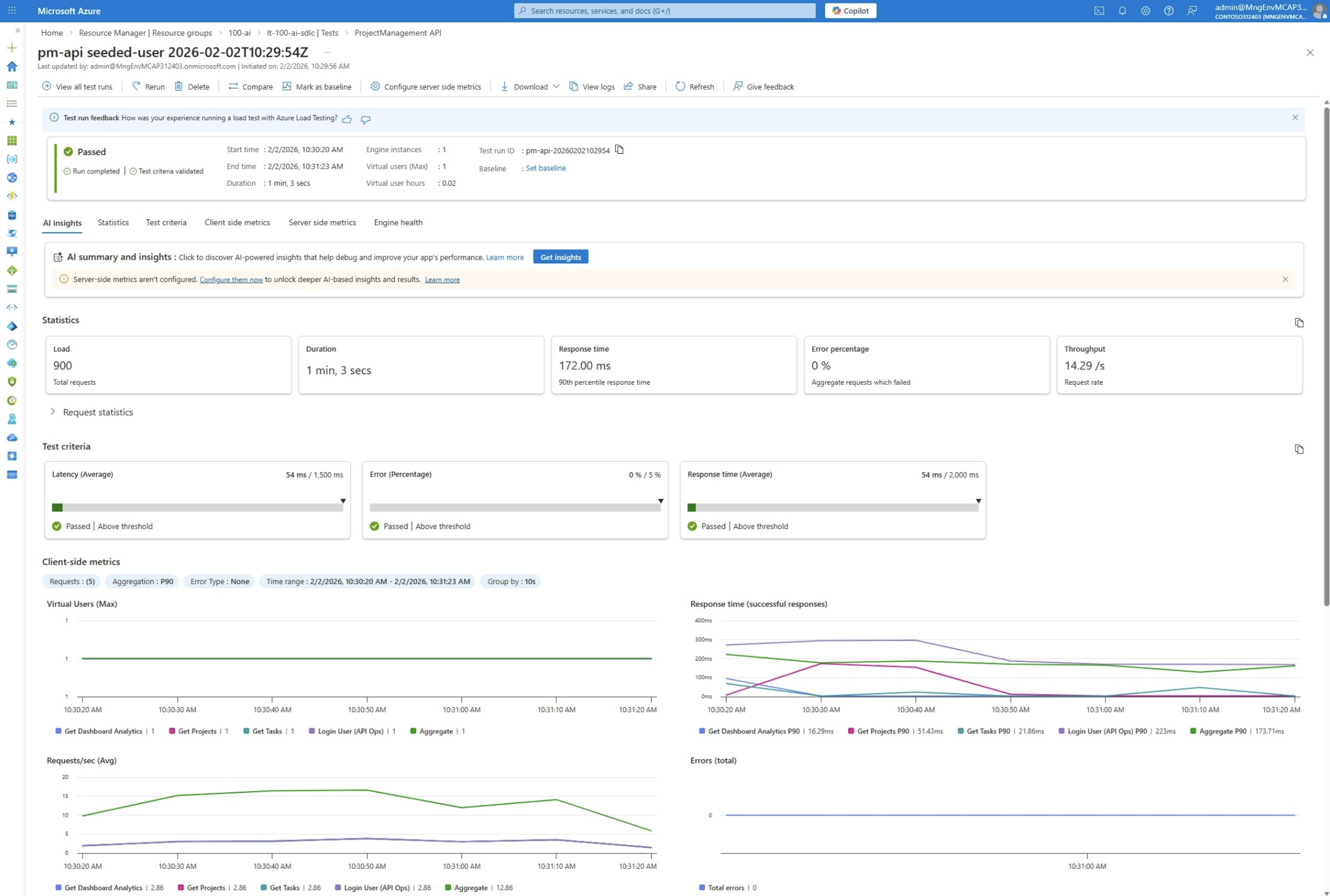
Goal
- Automated tests run on PR creation, enabling continuous pass/fail decisions
Steps (example)
- Configure CI in GitHub Actions and run a minimum set of tests (Lint / Unit / API, etc.)
- As needed, invoke Azure Load Testing or Playwright Workspaces (UI/E2E) from CI
- Define thresholds (failure conditions) and operate them as a quality gate
Deliverables
- A CI workflow (GitHub Actions)
- Test result artifacts (logs, reports, etc.)
Tip: Operating Practices for Starting Small
- Treat auto-created Issues as “proposals (candidates)” — humans make the final call
- Keep MVP scope tight and allow manual operations to prioritize the learning cycle
- Decide failure-handling boundaries (logs, notification destinations, responsibility split) up front
Summary
Expected Benefits
| Phase | Main Merit | Expected Improvement |
|---|---|---|
| Requirement | More efficient requirement extraction | Shorter analysis time |
| Build | Faster coding | Higher development productivity |
| Test | Test automation | Improved coverage |
| Operate | Operational automation | Shorter MTTR |
Note: Improvements vary by project size, characteristics, and adoption scope. Measure and verify quantitative benefits after adoption.
Considerations for Adoption
- Human review: Always have humans review AI output; final decisions rest with developers
- Security: Handle confidential information carefully and configure access permissions appropriately
- Phased adoption: Start with a small pilot and expand while validating the benefits
- Effect measurement: Define indicators (MTTR, lead time, coverage, etc.) before and after adoption and verify them periodically
Future Outlook
AI agents continue to evolve, and we can expect more autonomous development support.
- Multi-agent collaboration: Multiple agents cooperate to perform complex tasks (such as workflow agents in Microsoft Foundry)
- Deeper context understanding: Accumulation of project-specific knowledge through Copilot Memory and repository learning
- Predictive support: Detect early signs and take preventive action before issues occur, like the Memory feature in Azure SRE Agent
References
- GitHub Copilot features
- About Copilot cloud agent (formerly Copilot coding agent)
- About GitHub Copilot code review
- About GitHub Copilot Spaces
- Enhance agent mode with MCP
- What is Microsoft Foundry?
- What is Foundry Agent Service?
- Agents for Microsoft 365 Copilot
- Azure SRE Agent overview
- Tutorial: Connect to ServiceNow in Azure SRE Agent
- Tutorial: Connect to PagerDuty in Azure SRE Agent
- Azure Load Testing — Configure CI/CD workflows
- Playwright Workspaces — Quickstart for continuous E2E testing